
The real problem: blind spots, flaky footage, and too much guesswork
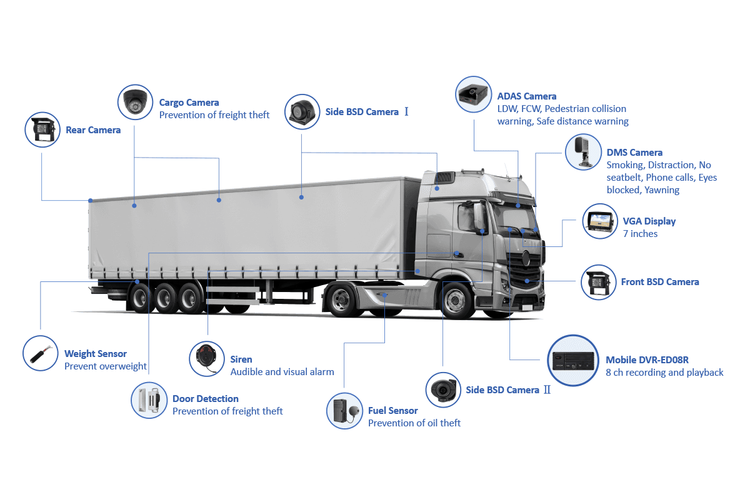
You buy four cameras for a truck thinking you’ve covered every angle, but footage drops, clocks don’t match, and nobody can replay the critical moment. That’s the issue most operators face — not a lack of cameras, but unreliable recording and disjointed data. For teams handling heavy assets, tying that video into broader mining fleet management is vital, and it’s the same layer that makes a mining vehicle tracking system truly useful when you need incident context and location together.
Why a 4-channel mobile DVR helps — simple and direct
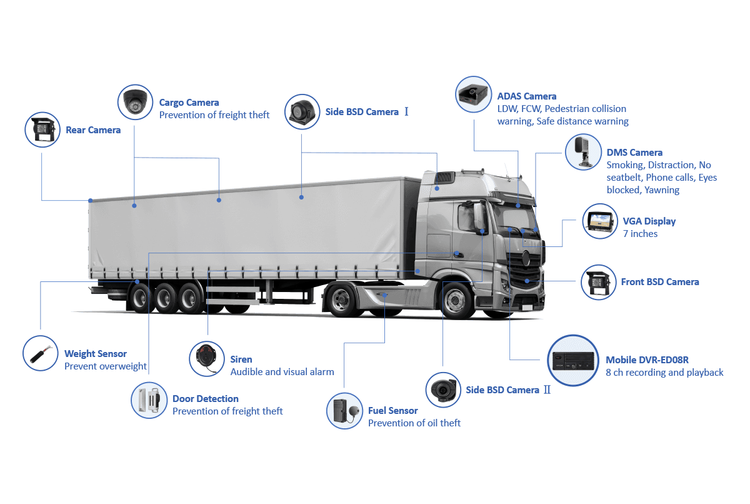
Think of the DVR as the video traffic cop. It keeps four streams orderly, timestamps them, stores them sensibly, and hands off events when something goes wrong. Key capabilities to expect:- Simultaneous write: true quad recording so no camera sits idle when an incident happens.- Timestamp + GPS sync: aligns video to location and speed, which matters for investigations.- Circular storage with smart overwrite: keeps the most recent hours while preserving flagged clips.- Event tagging (impact, harsh braking, geofence): makes retrieval fast instead of digging through hours of footage.
How these features fix the common problems
When footage is missing, it’s often a power, write-speed, or configuration issue — not the camera’s fault. A proper 4-channel DVR reduces those failure points by isolating streams, managing write buffers, and offering watchdogs that reboot failing inputs. Remote access helps too: if a supervisor can pull a clip over cellular while the truck’s on route, they don’t have to wait until the shift ends.
Practical setup tips that actually stop headaches
Setups that work in the real world follow rules that are easy to miss:- Place cameras for purpose: front (driver view), rear (backup/haul view), curbside, and offside to catch load spillage or side impacts.- Lower frame rate for long retention: 15–20 fps at 720p keeps clarity and extends storage.- Use a high-end industrial SD or SSD rated for vibration and temperature.- Add a DC-DC conditioner or wide-range power module so brownouts don’t corrupt files.- Enable GPS-linked timestamps and test them — mismatched clocks ruin timelines.- If you need live monitoring, configure cellular uplink with a clear data plan and edge compression to limit costs.
Common mistakes people keep repeating
Knowing these saves wasted time:- Assuming consumer cameras work in rough conditions — they don’t.- Using the DVR’s default settings — they’re rarely optimized for fleets.- Overlooking heat and dust ratings for storage devices.- Forgetting to secure remote access with credentials and encryption.- Expecting high-res footage forever — storage fills fast, so plan retention based on incident needs, not wishful thinking.
When you might pick something else
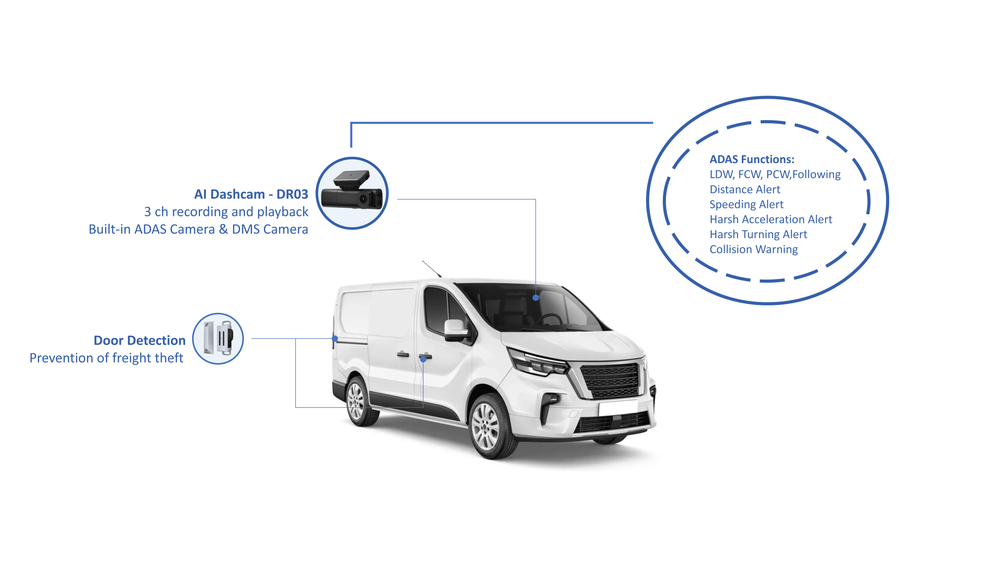
Four channels suit most medium commercial vehicles. Consider alternatives:- Cloud-first setups if you need continuous off-site archiving (higher data costs).- 8-channel DVRs when you want more angles or trailer-mounted cameras.- Single-camera systems for basic compliance only — they won’t help with multi-angle incident reconstruction.
Real-world note
Operations in the Pilbara region in Western Australia often combine rugged DVRs with vehicle tracking and scheduled maintenance alerts to keep uptime high on long haul cycles; that kind of pairing is a practical model for any intense mining operation.
Wrap-up: what actually delivers value
If your problem is inconsistent footage or slow investigations, a correctly configured 4-channel mobile DVR removes the guesswork: it records reliably, ties video to location and events, and makes clips retrievable under pressure. Pairing that capability with experienced system integration brings results that matter to drivers and managers alike, which is exactly the kind of practical solution BSJ has built into its fleet offerings.